
All features
A driver app designed for fast, accurate updates.
Large controls and a focused workflow make it easy to record stops, complete tasks, and report exceptions from the road.
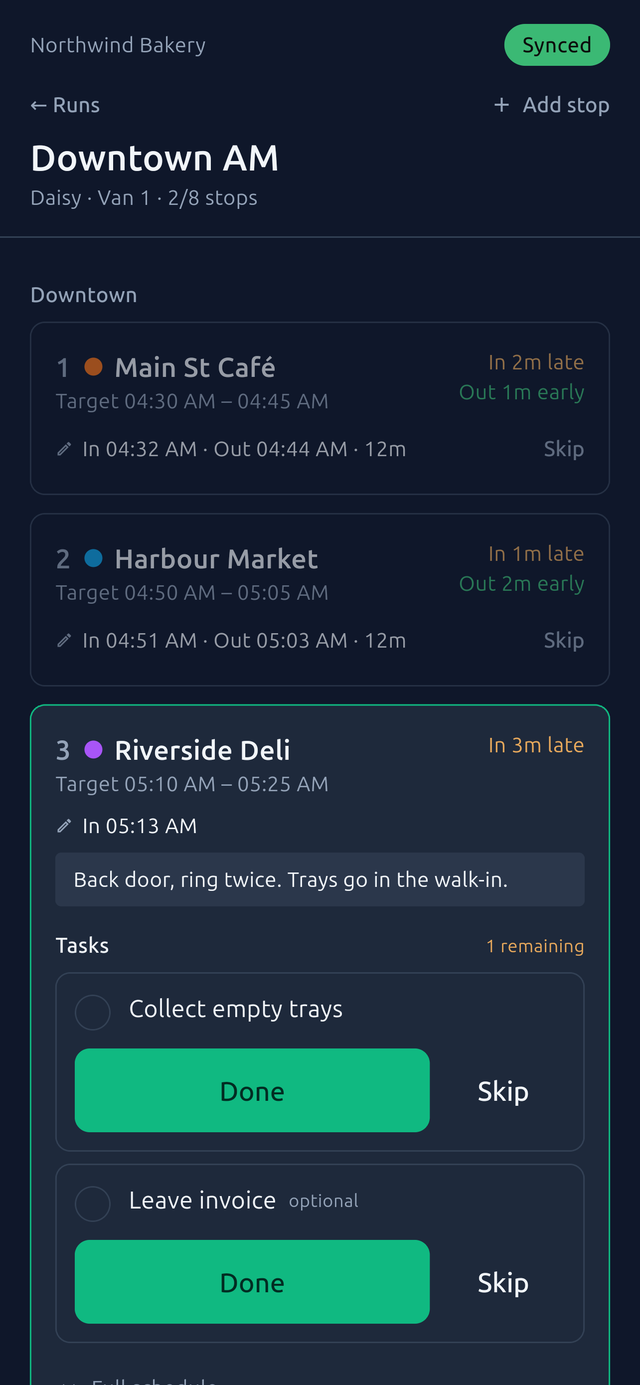
No driver account is required. A manager pairs the device, and each driver signs in with a six-digit PIN.
At the stop
Capture the complete stop record.
The driver taps
- Arrived when the van stops. The time is recorded, with the location attached if the driver allows it.
- Done on each task, or Skip with a reason.
- Note if something is off, like the shop being closed, no trays out, or the wrong order.
- Departed when the door shuts. Required tasks hold this button until they are done or skipped.
The office sees
- In and out times against the target, marked late or early.
- How long the driver spent at the stop.
- Which tasks were done, which were skipped, and why.
- Notes and the run's full history, with who did what and when.
2 · Harbour Market
Target 04:50 – 05:05
In 04:51 1m late · Out 05:03 2m early · 12m
Driver tools
Essential tools, available when needed.
- PIN sign-inThe driver types six digits on a keypad. It works offline, because the phone already knows the PIN.
- Today's runsThe driver sees their runs for the day with progress on each. Yesterday's stay visible, marked done.
- NavigateOne tap hands the stop's address to the phone's maps app.
- Unplanned stopsA driver can add a stop on the road. It joins the run and the office sees it.
- OdometerThe driver enters it at the start and end of every run, so the vehicle's mileage keeps itself.
- Time correctionsIf a driver tapped late, they can fix the time. The original and the change are both kept.
- Run sheetThe paper sheet can be printed from the phone or shared as a PDF.
- Late, early, dwellThese show as the day goes on, so a driver knows where they stand without asking.
Available on iPhone, Android, and the web.
Use the web app when installing a native app is not an option.